If you create shop.yourcompany.com, learn.yourcompany.com or any other subdomain in your hosting, you do not need to buy a certificate: your plan issues one for free and renews it automatically, just like for the main domain.
Subdomain on your hosting: free, automatic certificate
- Create the subdomain in cPanel → Websites and applications → Add website → Create a subdomain. See How to add an additional domain and create a subdomain.
- Make sure the subdomain points to your hosting (if your DNS is with us, cPanel creates the record automatically).
- Wait for the certificate: the system checks every few hours. You can see it in cPanel → Security, in the SSL certificates table; to avoid waiting, click Renew SSL automatically. (Classic design: Security → SSL/TLS Status → Run AutoSSL.)
- Once it shows as valid, force https for that subdomain. See How do I make my site always open with https?
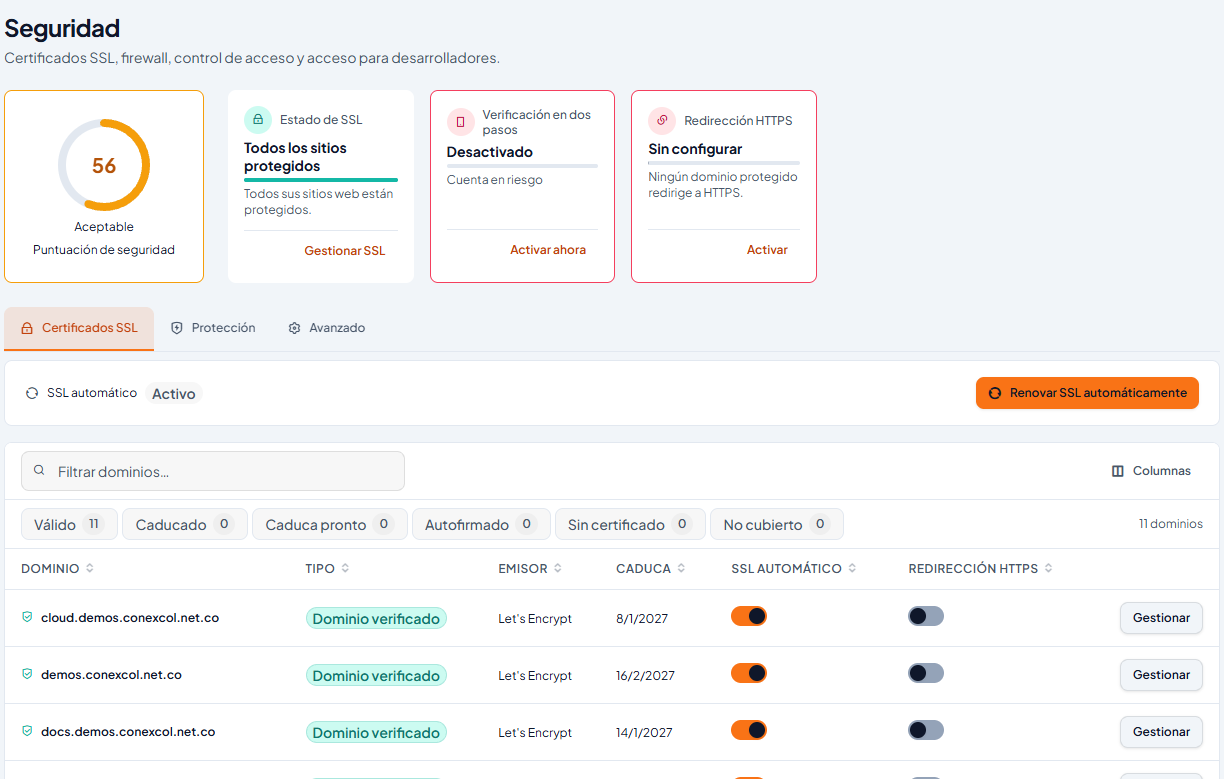
If the certificate is not issued
- The subdomain does not point to your hosting, or the DNS change is very recent. This is the most common cause.
- There is a CAA record in your DNS that does not allow Let's Encrypt.
- The subdomain is redirected to another address.
If it still fails after a few hours, write to us with the exact subdomain name.
Subdomain on another platform
If the subdomain points to another service (a store, a learning platform or your own server), that service provides the certificate, not your hosting. Almost every platform issues it automatically once the DNS record is right. See Point a domain or subdomain to another service.
When a paid certificate does make sense
- When your subdomains live on your own server (for example, a cloud server) and you prefer a single wildcard certificate (*.yourcompany.com) covering them all.
- When you need the certificate to show your company name (OV or EV validation), or a client, an audit or a payment gateway requires it.
See DV, OV and EV: which certificate to order and Paid SSL: purchase, validation, download and renewal. Note: if you buy a wildcard to use on your cPanel hosting, you will have to install and renew it every year; the free one renews itself.
More information
- Article (Spanish): AutoSSL: ver el estado SSL/TLS en cPanel