It is very common: your website and email are with us, but you want shop.yourcompany.com to open a store on another platform, app.yourcompany.com to go to your server, or an external service to verify your domain. That is done with a DNS record, without moving anything else.
Step 1: find out where your DNS is
The record is created wherever your domain's DNS is controlled:
- If your domain uses our name servers (dns1.conexcol.net and dns2.conexcol.net), create it in cPanel → Websites and applications → Manage on the domain → DNS tab (classic design: Domains → Zone Editor).
- If it uses another provider's (Cloudflare, your registrar, etc.), create it there.
If you are not sure, see Changing your hosting DNS or ask us.
Step 2: which record they ask for
| They give you… | You create… |
|---|---|
| An IP address (for example, 203.0.113.10) | An A record |
| A name (for example, shops.platform.com) | A CNAME record |
| A verification text | A TXT record |
Step 3: create it in cPanel
- cPanel → Websites and applications → Manage on your domain → DNS tab.
- Use Search DNS records to check whether a record with that name already exists (for example,
shop). If it does, click Edit instead of adding another: a name cannot have a CNAME and another record at the same time. - If not, click Add record, choose the Type, type the Name (
shop, or@for the root domain) and the value the platform gave you, exactly. - Save with Add record. In our zones the change shows within minutes. Screenshots show the panel in Spanish.
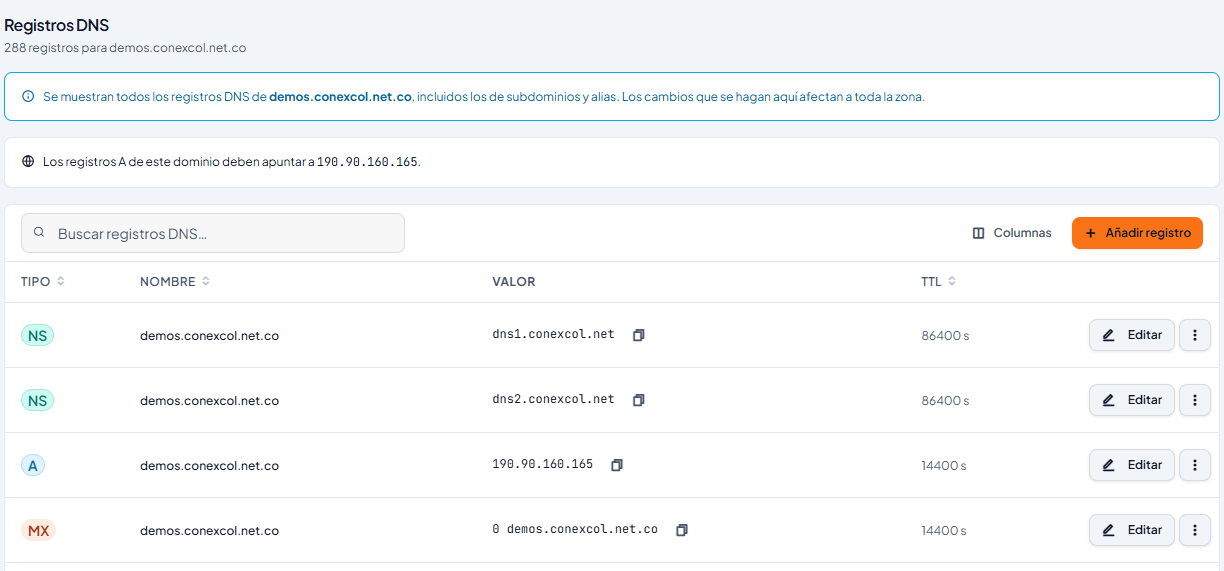
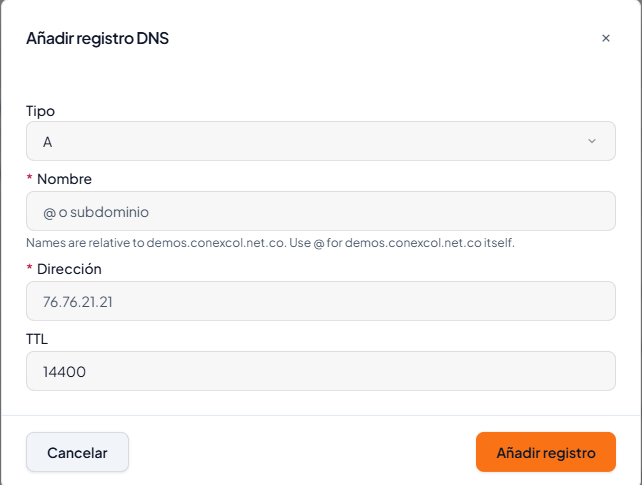
Do not create the subdomain under cPanel “Websites and applications” if it will live on another platform: that points it to your hosting. The Zone Editor record is enough.
Rules that avoid problems
- The root domain (yourcompany.com with nothing in front) cannot be a CNAME. If a platform asks you to point the root, use an A record with the IP they give you.
- Do not touch the MX or SPF unless you are moving email on purpose.
- Copy values without changing anything: one extra character breaks verification.
- The SSL certificate for a subdomain pointing to another platform is issued by that platform, not by your hosting. See Subdomains and SSL certificates.
Check that it worked
Test from your phone's mobile data, or with a tool like dnschecker.org: it should show the new value. If it does not appear after an hour, check you created it in the DNS that is in control (step 1).
Would you rather we do it? Open a ticket and paste exactly what the platform gave you: type, name and value.
More information
- Article (Spanish): TTL, registro A y CNAME (sin ser administrador de sistemas)
- Video (Spanish): Cómo administrar y configurar los registros DNS en cPanel