It takes two steps, in this order: first make sure the domain has a certificate, then force the redirect. If you force https before there is a certificate, the site stops loading.
1. Check that the domain has a certificate
Hosting plans with cPanel include free certificates that are issued and renewed automatically (AutoSSL) as soon as the domain points to your hosting.
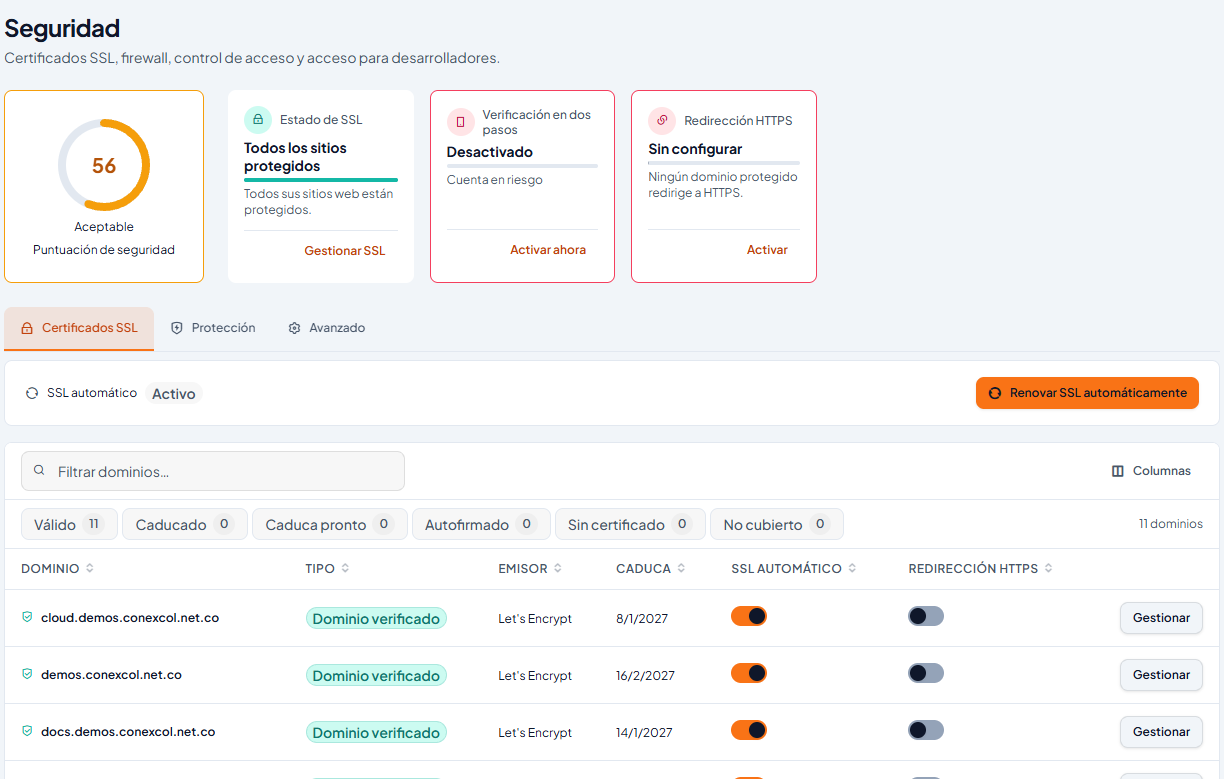
- Go to cPanel → Security. In the SSL certificates table, find your domain and also www.yourdomain.com: both should show as valid. (Classic design: Security → SSL/TLS Status.)
- If one has no certificate, the usual reason is that the domain does not point to your hosting yet (recent DNS change) or a CAA record in your DNS does not allow Let's Encrypt. See Free hosting SSL vs paid SSL.
2. Force https (one click)
- cPanel → Websites and applications → Manage on your domain → Settings tab.
- Turn on Force HTTPS. You can also do it from Security, in the HTTPS redirect column. (Classic design: Domains → Domains → Force HTTPS Redirect. Screenshots show the panel in Spanish.)
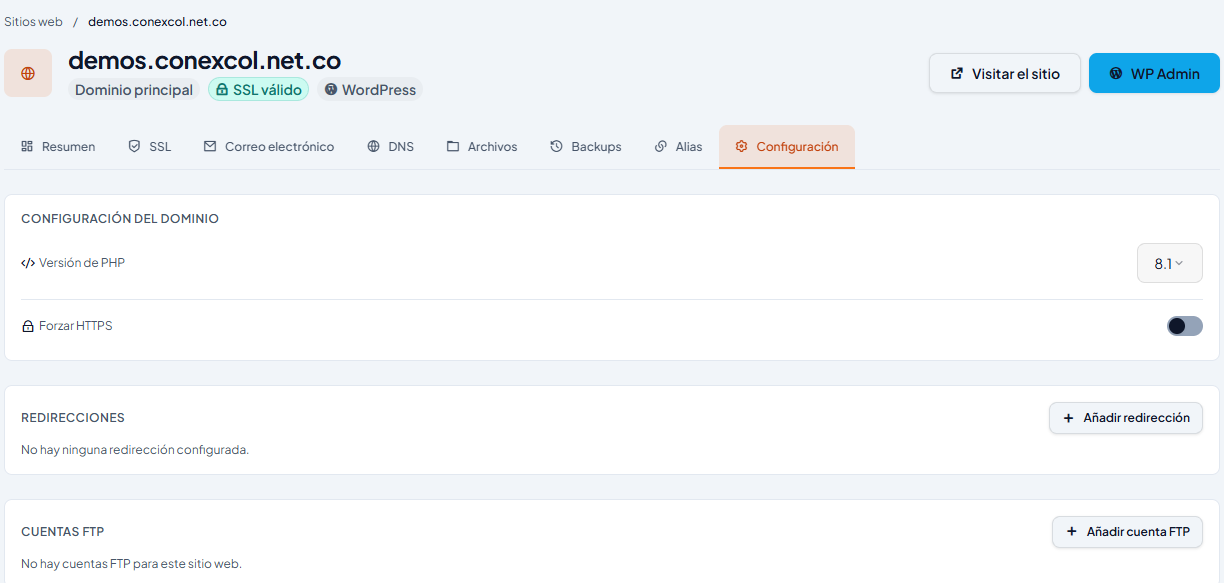
Done: anyone who visits http:// is sent to https:// automatically. If the switch will not turn on, the domain does not have a valid certificate yet: go back to step 1.
If you use WordPress
- In WordPress → Settings → General, change WordPress Address and Site Address to
https://. - If you then see a crossed-out padlock or a warning, it is mixed content: images or scripts still loading over http://. A plugin such as Really Simple SSL fixes it.
For Joomla, see How to activate SSL (https) for my Joomla website.
Manual method (only if the above does not work for you)
If you have your own rules in .htaccess, you can force https by adding this at the top of the .htaccess file in the domain's folder (for example, public_html):
RewriteEngine On
RewriteCond %{HTTPS} off
RewriteRule ^(.*)$ https://%{HTTP_HOST}/$1 [R=301,L]
Do not combine this rule with Force HTTPS Redirect: one is enough.
If something goes wrong
- I turned on the redirect and the site stopped loading: you did it before there was a certificate. Remove the redirect, wait for the certificate and turn it on again.
- “Too many redirects”: two redirects are fighting (for example, cPanel's and one from a plugin or CDN). Keep only one.
- “Not secure” only with www (or only without it): the certificate does not cover that name. Check that both appear in step 1.
Videos are in Spanish.
More information
- Article (Spanish): Activa HTTPS en cPanel