The ticket is the official support channel: it is tied to your account, has a number, keeps the whole conversation and emails you every time we reply. It is also the fastest way, because it goes straight to the team that can fix it.
Step by step
- Log in to the client portal (on conexcol.net.co, the “Client Access” button).
- Go to Support and open a new ticket.
- Choose the department: technical support for things that do not work, billing for payments, invoices and plan changes.
- Write a subject that states the problem in one line (“Not receiving email at invoices@mydomain.com”).
- Describe the case in the message and attach screenshots if they help.
- If your case is about a specific service, choose it under Related service (“Servicio relacionado”).
- Submit with Send request. You will get an email with the ticket number.
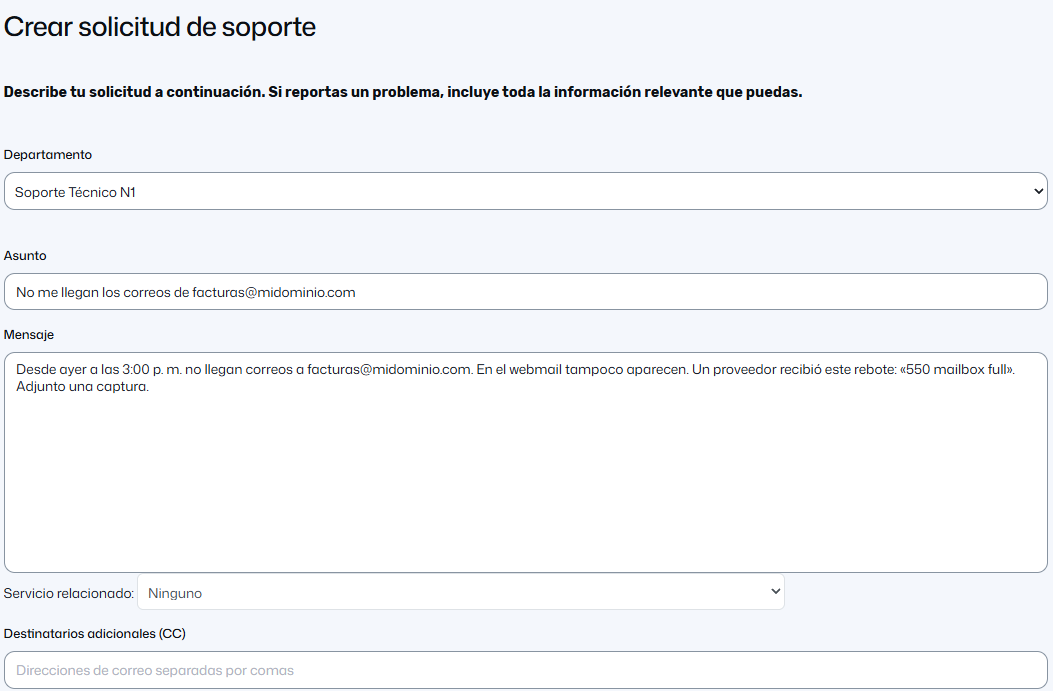
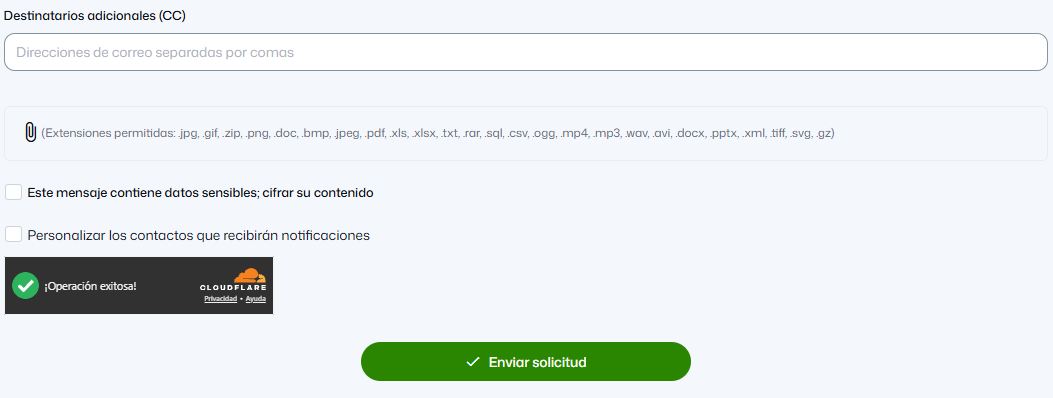
Screenshots show the portal in Spanish.
Reply inside the same ticket (in the portal or by replying to the email), so the whole history stays together. When the case is solved you can close it, and reopen it if it happens again.
Video (Spanish)
What gets a ticket solved in the first reply
- The exact domain or service affected.
- What fails and since when, and whether it coincided with a change (new password, plugin, DNS change).
- The full error message, copied or as a complete screenshot, not summarized.
- The approximate time it happened: we use it to search the logs.
- Your public IP if nothing works from your office (see Why your IP was blocked).
Never write passwords in a ticket. We do not need them to help you, and if we ever have to give you a new one, we do it through a secure channel.
Write from the authorized email
For sensitive changes — unblocking an IP, changing the primary domain, handing over a transfer code, resetting access — the request has to come from your portal account, the account holder's email or an authorized contact. That is what stops someone else from making changes in your name. See Give another person access to your account.
Hours and response times
Technical support works Monday to Friday from 7:00 a.m. to 9:00 p.m., and Saturdays, Sundays and holidays from 8:00 a.m. to 3:00 p.m. (Colombia time), as shown on our contact page. Committed response times are in our service level agreement (SLA). Outside those hours, leave the ticket with all the details: it is picked up in the first support window.
Other channels
You can also call us at +57 (601) 381 9262 or use the chat on conexcol.net.co, which are handy for guidance. WhatsApp and social media are not technical support channels. If the case requires checking or changing something in your service, we will ask you to put it in a ticket.
Before writing to us
Many questions are solved in minutes with these guides: My email does not work, Errors 500, 502, 503, 504 and 508, How to log in to cPanel and I paid and my service is still suspended.
More information
- Article (Spanish): Cómo crear un ticket de soporte