cPanel is where you manage your hosting: files, email, databases, backups and DNS records. This article answers the two questions we get most: what the address is, and what to do if you do not have the password.
The easiest way: from the portal
Log in to the client portal, open your hosting service and click “Open cPanel”. You get in directly without typing the cPanel password. The same page also has “Access webmail” and “Reset Password”.
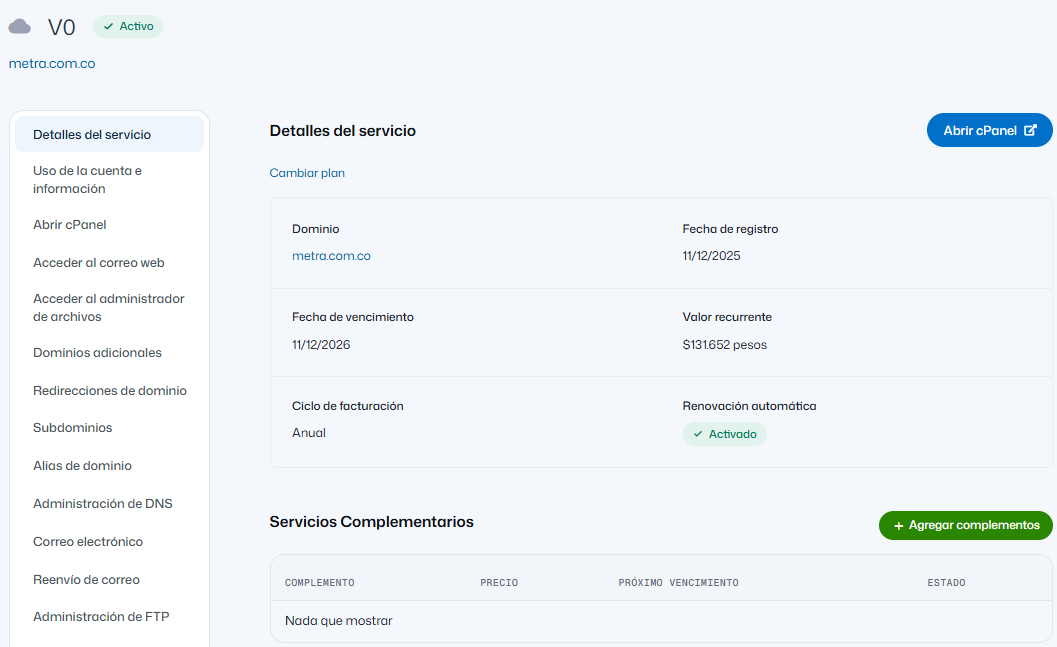
Screenshot in Spanish.
The direct address
https://<your-server-name>:2083/, and once your domain points to the account, also https://www.yourdomain.com:2083/. If the browser says “not secure” on a new account, the certificate is still being issued: use the server-name address meanwhile. Your server name is in your hosting welcome email, with your username.
I lost the password
Stop trying. Several failed attempts block the IP you connect from, and then the whole office is locked out, email included. See Why your IP was blocked.
If you can log in to the portal, open your hosting service and use “Reset Password”. If you cannot, write to soporte@conexcol.net.co from your registered email with your domain; we verify the account is yours before resetting anything.
The cPanel password is not the email or portal password
| Client portal | Invoices, payments, tickets, services |
| cPanel | Managing the hosting: files, databases, mailboxes |
| Each email account | Only that account, in webmail or your email program |
They are three different passwords; changing one does not change the others.
Where things are inside
DNS records → the Zone Editor (see Changing your hosting DNS). Backups → JetBackup (see Restore a backup). Email accounts → created, password changes and quotas.
Frequently asked questions
Can I give my developer access without my password? Yes, and you should; write to us and we will suggest the best way. I changed the cPanel password and my email stopped working. They are not linked; it is most likely an IP block from failed attempts. cPanel does not load. Try from mobile data: if it loads there, your IP is blocked. Can I use it from my phone? Yes, same address. Several domains, several cPanels? Separate accounts each have their own; addon domains share one.
For extra protection, turn on two-step verification.