In the new cPanel
- Open Websites and applications: the PHP column shows each domain's version.
- Click Manage on the domain → Settings tab → PHP version and choose the version.
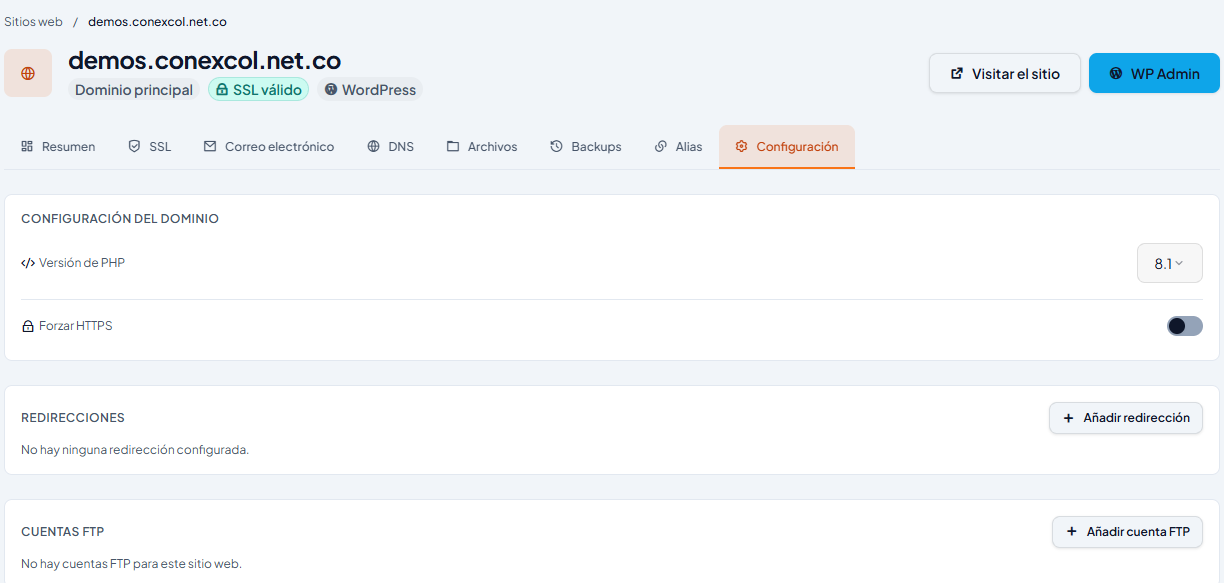
PHP extensions and options (for example, memory_limit) are changed in Select PHP Version, which is in the classic design. Before changing version, read Why update your site's PHP version and how to do it without breaking it. Screenshots show the panel in Spanish.
If your cPanel has the classic design
If your panel shows icons grouped in sections, you are on the classic design: follow these steps, or switch to the new design from the button at the top of the panel.
To change the PHP version of the entire web hosting service, just enter your cPanel, Search the Software section and then choose "Select PHP version"
If you want to change the PHP version of another domain or sub domain without affecting the general version of your hosting, in your cPanel account in the Software section, select MultiPHP Administrator, select the domain or subdomain and finally the PHP version and then apply.
