Your invoice is paid from the client portal: open the pending service order and click “Pay now” (step by step in How can I pay my invoice online?). This article covers what people rarely ask until they need it: when the electronic invoice arrives, which email it goes to, and what to do if your company applies withholdings.
The service order is not the electronic invoice
- The ODS (service order), or “pre-invoice”, is what you pay with. The system creates it before each due date and you see it in the portal.
- The electronic invoice is the tax document and comes afterwards, once the payment is recorded.
They have different numbering: ODS##### in the portal and FE##### on the invoice. If your accountant asks for “the invoice”, they need the second one.
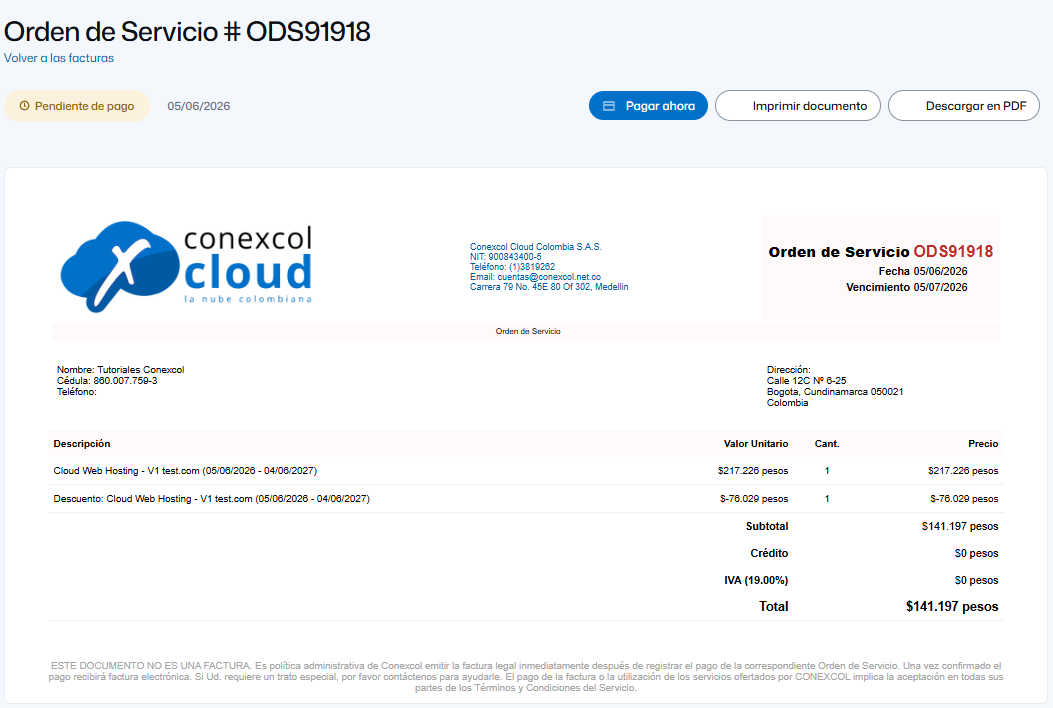
Screenshots show the portal in Spanish.
If your company applies withholdings
When paying, tell us which withholdings you applied. Send with the payment receipt: the order or invoice number, which withholdings and for how much each, and the receipt. Otherwise the difference stays as a pending balance. If you always withhold, ask billing to apply it in advance on the service order so you pay the net amount directly.
When a withheld amount must be recognized to you, you choose: credit for your next invoices, or a refund (we need the bank certificate of the account).
When the order is created and how long you have
The system creates the service order between 10 and 15 days before the due date and emails it to you (today usually 13 or 15 days). SSL certificates are not renewed early, so their order may come with less margin. If the order is not paid, the service is suspended 3 to 5 days after the due date.
The electronic invoice: when and to which email
It is issued when the payment is recorded, usually the same day. The order and the invoice may go to different mailboxes: service orders, reminders and portal credentials go to the account's main authorized email; the invoice goes to the email registered in the e-invoicing system. Either can be updated by asking billing.
Invoice before paying
It is called an advance electronic invoice: ask billing with the order number, or ask us to generate the order if the system has not yet. It cannot be automated; if you need it every renewal, tell us about a month before each date.
Withholding certificates
Issued on request (no automatic yearly sending). Ask with the tax year and the exact tax ID or company name. This applies to income tax, ReteICA and ReteIVA (bimonthly). If there were no withholdings that year, we confirm it in writing.
Supplier registration forms
Send us your supplier form and we return it filled in and signed. Tell us if you also need the RUT, chamber of commerce certificate, bank certificate or the legal representative's ID.
Two things to review once a year
- Your tax details (company name, tax ID, address, VAT status). An invoice issued with old details requires a credit note and a new invoice.
- The main authorized email. It is the account's key; if the person who had it left, change it.
Changing the main email
Write to billing from the current main email stating the new one. If nobody has access to it anymore, write from another one attaching documents to verify your identity (usually RUT, chamber of commerce certificate and the legal representative's ID for companies). Changing it resets the portal password, which goes to the new email. For your accountant to receive orders without changing the main one, ask for additional authorized emails (also from the main email).
Where to write
facturacion@conexcol.net.co, the chat on conexcol.net.co choosing “Facturación”, or a ticket from the portal; by phone, extension 2. Write from the main authorized email and include the order or invoice number.