You already have the payment link: it is inside your invoice in the client portal. Below is the step-by-step. If you are going to pay by bank deposit or transfer, read “The difference that avoids the most problems”: it is the only path that can leave your service suspended after you paid.
Step by step
- Go to conexcol.net.co and click “Client Access” at the top, or go straight to portal.conexcol.net.co/clientarea/.
- Log in with the details we sent when your account was created (the “New Access Password” email). If you cannot get in, see “If you cannot log in” below.
- Open Billing. There you see all your service orders (ODS, also called “pre-invoices”) with their status: pending, paid or cancelled.
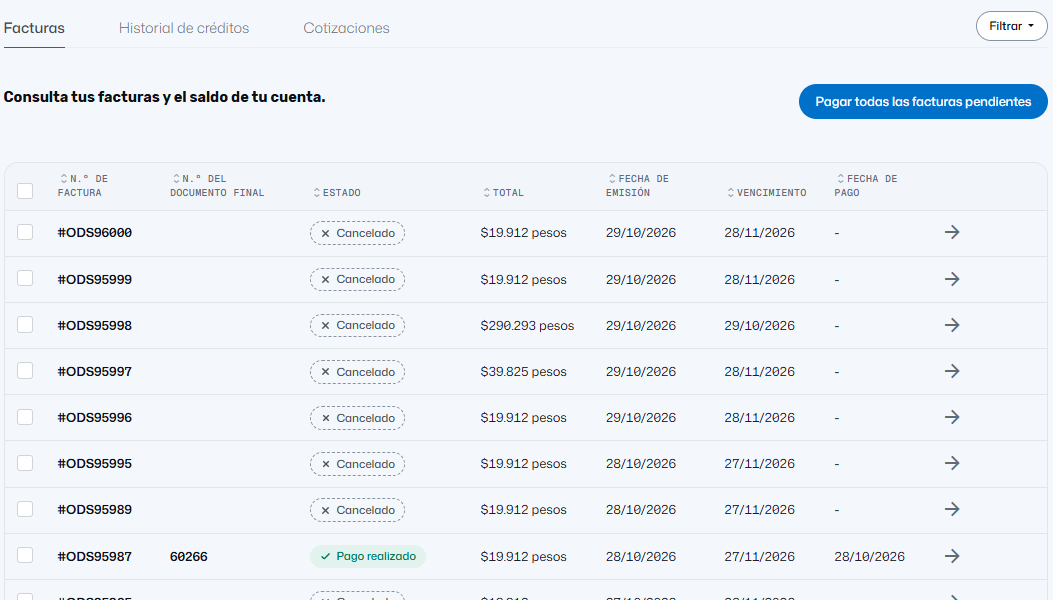
- Click the pending order you want to pay and then the blue “Pay now” button.

Screenshots show the portal in Spanish.
- Choose how to pay. The options may include Payvalida, PayU, PayPal (only from outside Colombia), Bancolombia deposit or transfer, and international bank transfer. Payvalida and PayU are gateways: the actual payment method (PSE, card, cash) is chosen inside them.
Payment methods inside the gateway
- Bank debit: PSE with all banks; Nequi and Daviplata also go through here.
- Bancolombia button: pay directly from your Bancolombia account.
- Credit card: Visa, Mastercard, American Express, Diners Club and others the gateway enables.
- Cash: Efecty, Gana, Bancolombia agents and other networks. You get an agreement code and a reference number; pay to the reference number, not to your ID number.
- Transfer or deposit: ask us for the bank certificate. You must report the payment.
The exact list is set by the gateway and can change; what you see in the portal when paying is what counts.
The only method that costs more: PayPal
With Colombian methods you pay the invoice amount and nothing else. PayPal adds a “PayPal Payment Fee” line of 5.40% of the amount (plus USD 0.30 in some currencies), which is the transaction fee.
The difference that avoids the most problems
Inside the portal (PSE, card, Bancolombia button, cash with reference): the payment is recorded automatically and applied to the order; you do not need to send us anything. A cloud server renews within minutes to an hour; a domain renewal can take up to an hour to resolve again.
Outside the portal (transfer or deposit): the money reaches the bank but nobody links it to your invoice until someone does it by hand, and transfers from another bank take about a day. Send us the receipt: it is the only thing that shortens the wait.
If your service was already suspended or cancelled, let us know as soon as you pay, even if you paid through the portal: restoration does not start on its own. If your invoice is due today, pay through the portal, not by transfer.
How to report a payment
Report it when you paid by transfer or deposit, or when your service was suspended. Write in the same ticket or to facturacion@conexcol.net.co with: the receipt, which service order(s) it covers (and how much for each if one payment covers several), and from the account's authorized email. If you applied tax withholdings, tell us which and how much; otherwise a balance stays pending. See Electronic invoice and withholdings.
The payment receipt and the electronic invoice are not the same
You download the payment receipt yourself from the portal as soon as the payment is applied. The electronic invoice is the tax document: our administrative team issues it after payment and sends it to the registered email in the following days.
Before paying, check two things
- That your billing details (company name, tax ID, address) are correct: an invoice issued with old details has to be cancelled and reissued.
- Whether your company applies withholdings: paying a different amount without telling us leaves a balance that can keep the service suspended.
Frequently asked questions
Can you send me the payment link? It is already in the pending order, in the blue “Pay now” button. Can payment be automatic? No: Conexcol does not do direct debit. The system creates the order before the due date and emails you; you always decide and pay. A domain's auto-renewal also only creates the invoice and the notice. Several invoices at once? The portal pays one order at a time; ask us and we will merge them into one. From outside Colombia? Yes: PayPal and international transfer appear, and international credit cards go through PayU. I paid and I am still suspended: see I paid and my service is still suspended.
If you cannot log in to the portal
Use password recovery on the login screen. If the registered email no longer exists, write to us with your domain and your role in the company. Check this before an invoice is urgent.
Video (Spanish)
More information
- Article (Spanish): Cómo pagar tu factura de Conexcol en línea