Your accountant needs to pay invoices, your developer has to open tickets, a partner wants to see your services. Sharing your portal password with them is the worst way to do it: there is no record of who did what, and when that person stops working with you, you will have to change it everywhere.
The right way is to create a contact with their own login and only the permissions they need.
Create a contact
- Log in to the client portal.
- In the left menu, open Authorized users (“Usuarios autorizados”) and click Add contact. If you would rather the person fill in their own details, use Invite user.
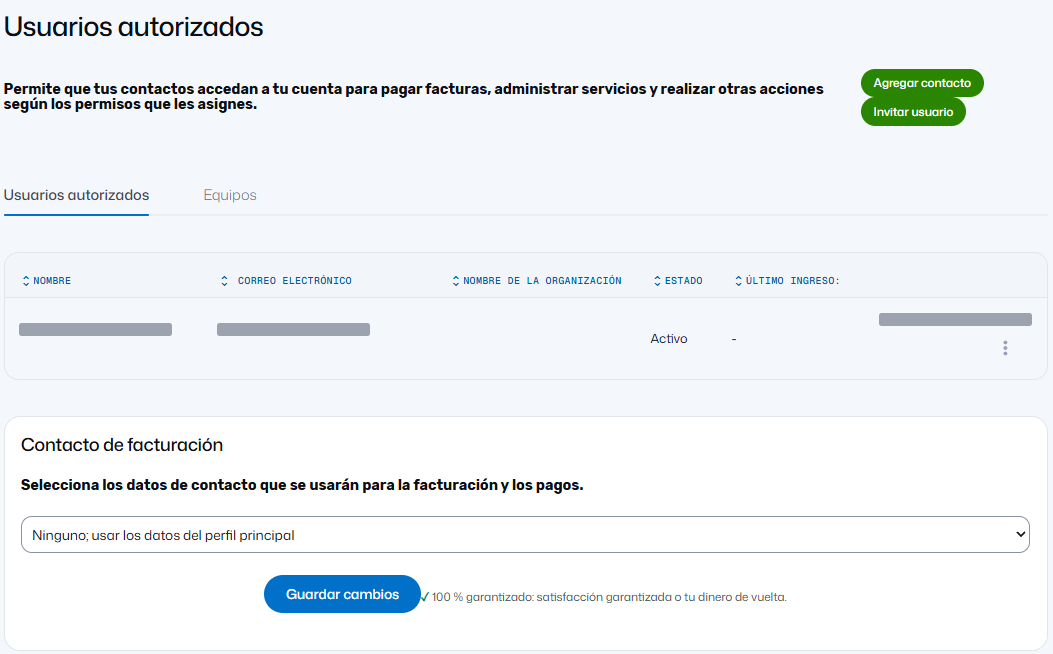
- Fill in the person's details (name, email and the billing details the form asks for).
- Under Permissions, choose a predefined profile (Accounting, Technical staff or All privileges) or tick what they need one by one. Further down you can adjust permissions per service.
- Click Send. The person logs in to the portal with their own email and password.
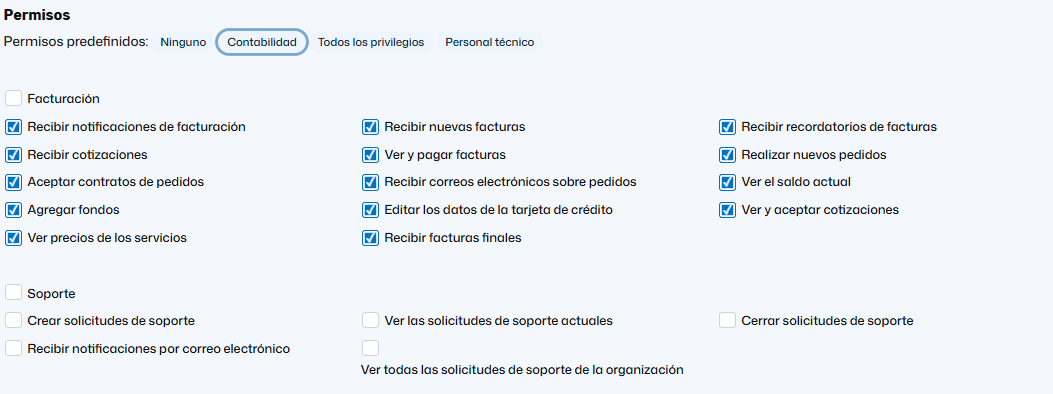
On that same page, under Billing contact, you can choose which contact receives billing and payment information. Screenshots show the portal in Spanish.
Permission examples by role
| Who | What they usually need |
|---|---|
| Accounting | View and pay invoices, receive billing notices |
| Developer or agency | View services and open tickets |
| Management or partner | View services and invoices |
Why it matters more than it seems
- Sensitive requests — unblocking an IP, changing the primary domain, asking for a transfer code — are only handled if they come from the account holder's email or an authorized contact. If your developer is a contact, they can request them without you forwarding emails.
- The day that person leaves, you remove them from contacts and that is it. No passwords to change.
- There is a record. Under Account you have the activity log: logins and changes, with date and IP. If you see something you do not recognize, change your password and write to us.
What about cPanel?
Portal contacts are for your account with Conexcol (invoices, services, tickets). If someone needs to work inside the hosting, do not give them the cPanel password: depending on the job, their own FTP account limited to one folder, or their own mailbox, may be enough. Write to us and we will suggest the best option.
The account's main email
It is the key to everything: it receives invoices, notices and password recovery. If the person who had it no longer works at the company, change it. How to do it is in Electronic invoice, withholdings and certificates.